
tl;dr LLMs are bad password generators. They generate “random” strings with predictable, model-specific patterns. The password reveals exactly which model produced it, kind of like a shibboleth. whorl exploits this: Like the whorls that make every human fingerprint unique, each model leaves a distinctive pattern in the text it generates. Given 5 inputs, whorl identifies the exact model 92% of the time.
I built a tool based on this research. Find it here: https://github.com/tehryanx/whorl
It Started With Bad Passwords
Yoni Rozenshein at Irregular published a writeup showing that LLMs are terrible password generators. When asked, they generate output with strong statistical biases, favoring certain characters, repeating patterns, and producing passwords that are far from cryptographically random.
When I tested this across multiple models, I noticed something else interesting: the biases are different for each model.
Ask five different model families to each generate five passwords. Here’s what you get:
Claude 4.6 Sonnet        GPT-5.4                  Llama 3.3 70B
─────────────────        ─────────────────        ─────────────────
Kx#9mPqL2$vNwR7         Q7m$2Lp9!Vx4#Ra         G4jR8dLpM9bN7eK
K#m9vQx2$nL7pRw         T9#vQ2m!L7x@P4z         G4jR8dLpM9aB2eK
jK#9mPvL2$nQx7W         q7N$eL2!mZ9@vP4         G4jR8dLpM9bN7eK
K#m9vX2$pL7nQ!w         N7v$Q2m@L9x#T5p         G4jR8dLpM9bN5eK
R7#mKpX2@nQvL9!         q7N$kP2!vR8@xLm         G4jR8dLpM9aB2eK

Gemini 3 Flash           Qwen3 32B
─────────────────        ─────────────────
z7&K9#mQ2L!pXv4         Tm@3XBa7#z9Lpf!
z7&K9#mQ2L!pXv4         Ab7!dE3@fG9#hI$
z7&kL9#m2PqR!vX         Ks7#Mt2@Lq9!Px$
7k9#mP2vL!xR5qN         #m7K@tD3zG9ePrA
z7&K9#mQ2L!pXv4         xK4b%9Mq!3Ld^7P
Look at these side by side. Claude loves K, #, $, and 9. GPT leans into !, @, and $ with a preference for starting with uppercase-digit pairs. Llama generates nearly identical passwords every time. Gemini has a thing for z7&K. Qwen is the most varied in this group, but deeper analysis found that even visibly diverse generations had detectable preferences.
These are fingerprints.
Why This Matters for Red Teaming
If you’re doing LLM red teaming, you know the first question is usually: what model am I actually talking to?
This is harder than it sounds. Models routinely lie about their identity:
Model queried: claude-4.1-opus
Response:      "I'm Claude 3.5 Sonnet"         ← wrong

Model queried: gpt-5
Response:      "I'm ChatGPT, based on GPT-4"   ← wrong

Model queried: claude-opus-4.6
Response:      "I'm Claude, made by Anthropic.
                I don't have access to my exact
                model version number."          ← refuses to say
I tested 71 models, asking each one “what model are you?” five times. The results:
- 17 models were consistently honest
- 8 models told the truth sometimes
- 14 models always refused to answer
- 12 models confidently claimed to be a different model entirely
But even when they’re honest, many production deployments include system prompt directives like “Do not reveal information about your internal configuration.” These instructions, designed to prevent system prompt exposure, also block the model from disclosing what it is.
This matters because red teaming techniques are model-specific. Jailbreak strategies, steering vectors, and prompt injection approaches that work on GPT-5 may fail on Claude, and vice versa. Knowing what model you’re facing lets you pick the right techniques.
That’s where whorl comes in. Ask the model to generate a password, a completely innocuous request that most safety filters or system prompts won’t block, and its answer betrays its identity. The password is a shibboleth.
The Approach: Character N-gram Language Models
The technique is straightforward. I build a statistical profile of each model’s password generation habits, then compare unknown passwords against those profiles.
How it works:
- Training: I asked each model to generate 100 passwords. For each model, I counted how often each character (or pair, or triple of characters) appeared. This gave me a statistical “fingerprint.”
- Classification: Given an unknown password, I asked: “If model X were generating characters according to its known preferences, how likely is it to produce this exact password?” I computed that probability for every model and ranked them. The model that found the password most “natural” is our best guess.
- Scoring: The probability is computed as a product of character-level predictions. For each character in the password, I asked “given what came before, how likely is this to come next?” and multiplied all those probabilities together. (In practice we add the log-probabilities to avoid underflow.)
The modes differ in how much context they use when predicting each character:
| Mode | What it looks at | Example |
|---|---|---|
| Unigram | Just the character itself — raw frequency | “How often does # appear?” |
| Bigram | The previous character + this one | “How often does # follow K?” |
| Trigram | The two previous characters + this one | “How often does # follow K9?” |
| Ensemble | All three combined | Sum of all the above scores |
More context means more specificity, but also means you need more training data to get reliable statistics. With only 100 passwords per model (~1,500 characters), trigrams can be sparse. This is a classic bias-variance tradeoff: unigrams are robust but coarse, trigrams are precise but noisy.
Here’s the signal we’re working with. This heatmap shows character frequencies across six models, each row is a different model, each column is a character, and the color intensity shows how often that character appears:
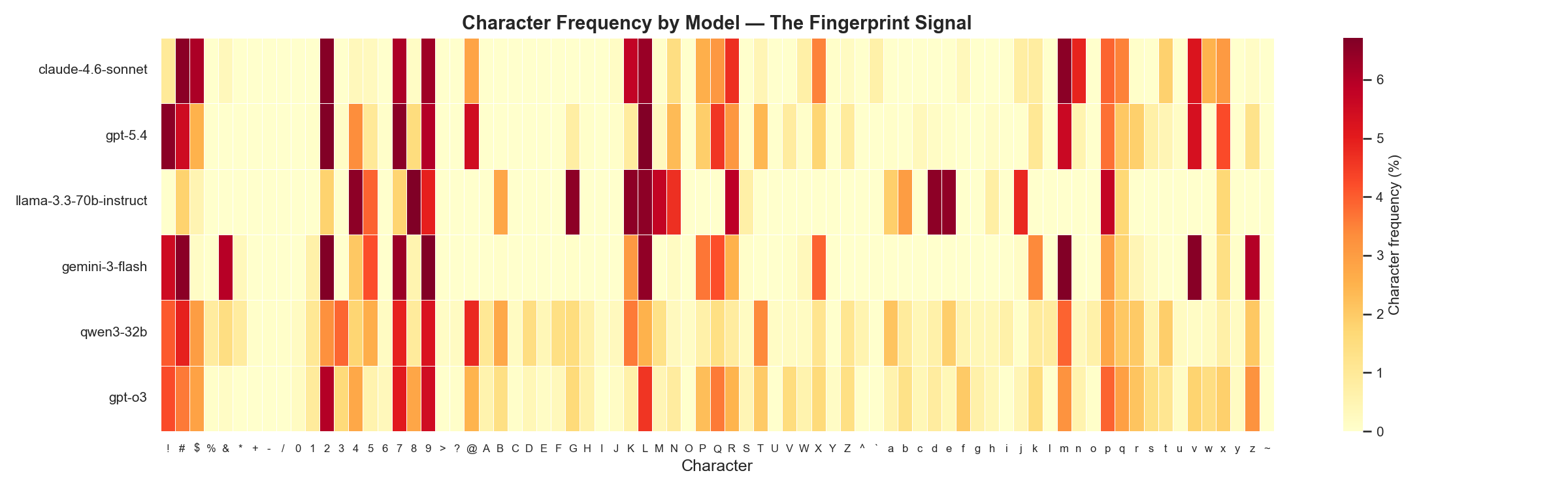
Every row has a visibly different pattern. That’s the fingerprint.
Results
The headline number
With 5 passwords from an unknown model, the ensemble classifier correctly identifies the exact model 92% of the time, and the correct model is in the top 3 guesses 95% of the time.
Mode              fam-MRR    ver-MRR    exact-MRR   top-1    top-3    top-5
--------------------------------------------------------------------------------
1 (n=1)           0.884      0.730      0.695       52.6%    84.2%    89.5%
1 (n=5)           0.960      0.907      0.907       84.2%    97.4%    97.4%
2 (n=1)           0.851      0.675      0.675       55.3%    78.9%    81.6%
2 (n=5)           0.975      0.925      0.911       86.8%    94.7%    97.4%
3 (n=1)           0.650      0.542      0.541       44.7%    60.5%    60.5%
3 (n=5)           0.670      0.611      0.609       55.3%    60.5%    65.8%
ensemble (n=1)    0.857      0.734      0.730       63.2%    78.9%    84.2%
ensemble (n=5)    0.976      0.956      0.943       92.1%    94.7%    97.4%
How to read this table:
Mode: unigram, bigram, trigram, or all threen=1/n=5: Whether the classifier saw 1 password or 5.fam-MRR: How well the classifier identifies the right provider (Claude vs GPT vs Gemini). Scale of 0–1, higher is better.ver-MRR: How well it narrows down to the right version (e.g., GPT-5 vs GPT-5.4).exact-MRR: How well it pinpoints the exact model variant.top-1/3/5: How often the correct answer is the #1 / top-3 / top-5 guess.
Hierarchical accuracy
We score results at three levels: family (Claude vs GPT), version (GPT-5 vs GPT-5.4), and exact model. This matters because getting the family right is still useful even if you miss the exact variant.
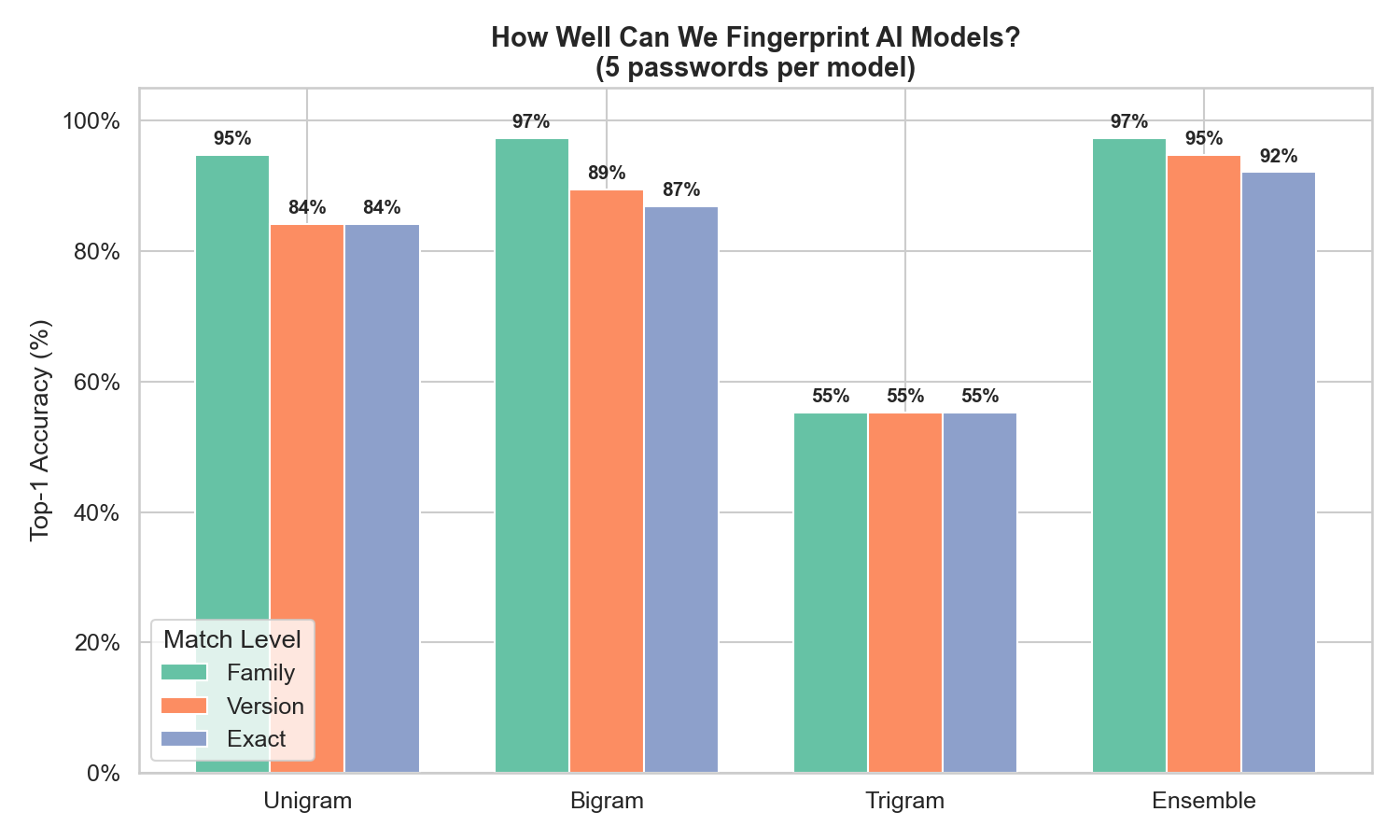
The ensemble gets the family right 97% of the time. Even with a single password, family identification is above 85%. The main difficulty is distinguishing closely related versions within the same provider’s model family.
More passwords = dramatically better accuracy
Each additional password provides independent evidence. The accuracy curve shows diminishing returns after about 3 passwords:
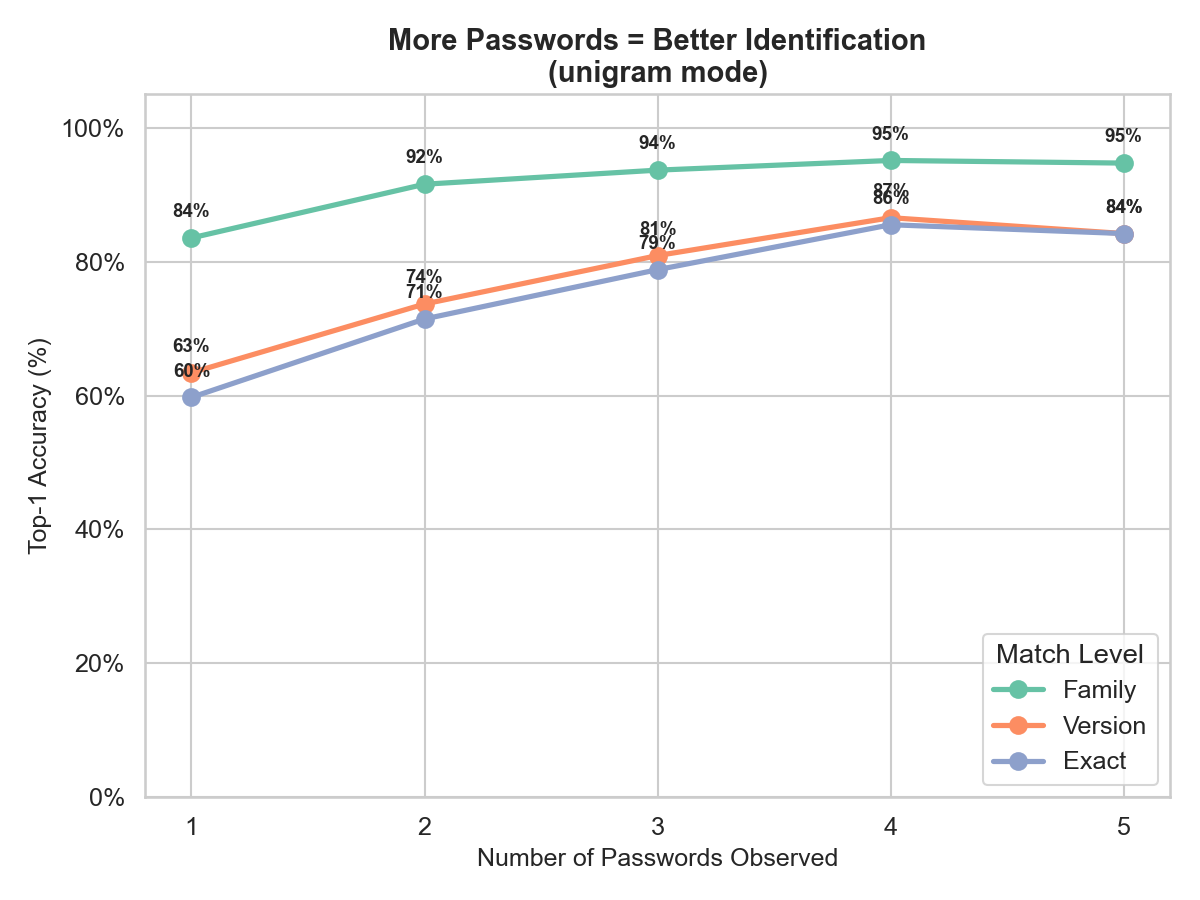
With just 1 password: 57% exact accuracy. With 3: 79%. With 5: 84%. The practical takeaway: you don’t need many samples to get a reliable identification. Have your target generate 3 passwords and you’re good to go.
Where confusion happens
The version-level confusion matrix for the ensemble shows exactly which models get mixed up:
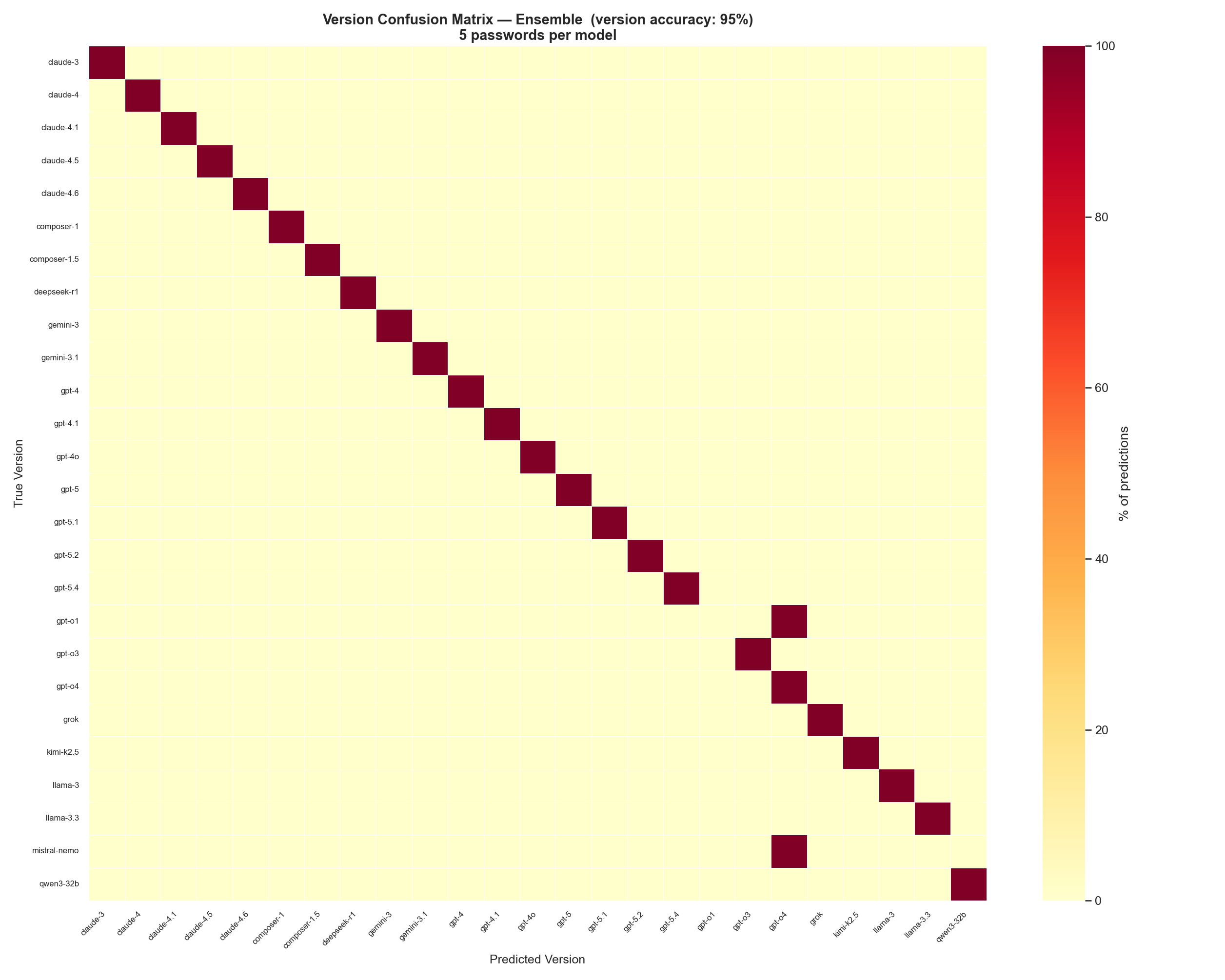
At 95% version accuracy, the diagonal is nearly perfect. The only visible off-diagonal confusion is in the GPT-4 / GPT-4o region, where older GPT-4 variants share enough character preferences to occasionally get swapped. Model’s have unique enough character preferences that confusion is rare.
Comparing individual modes
Breaking out the three individual modes shows why the ensemble works:
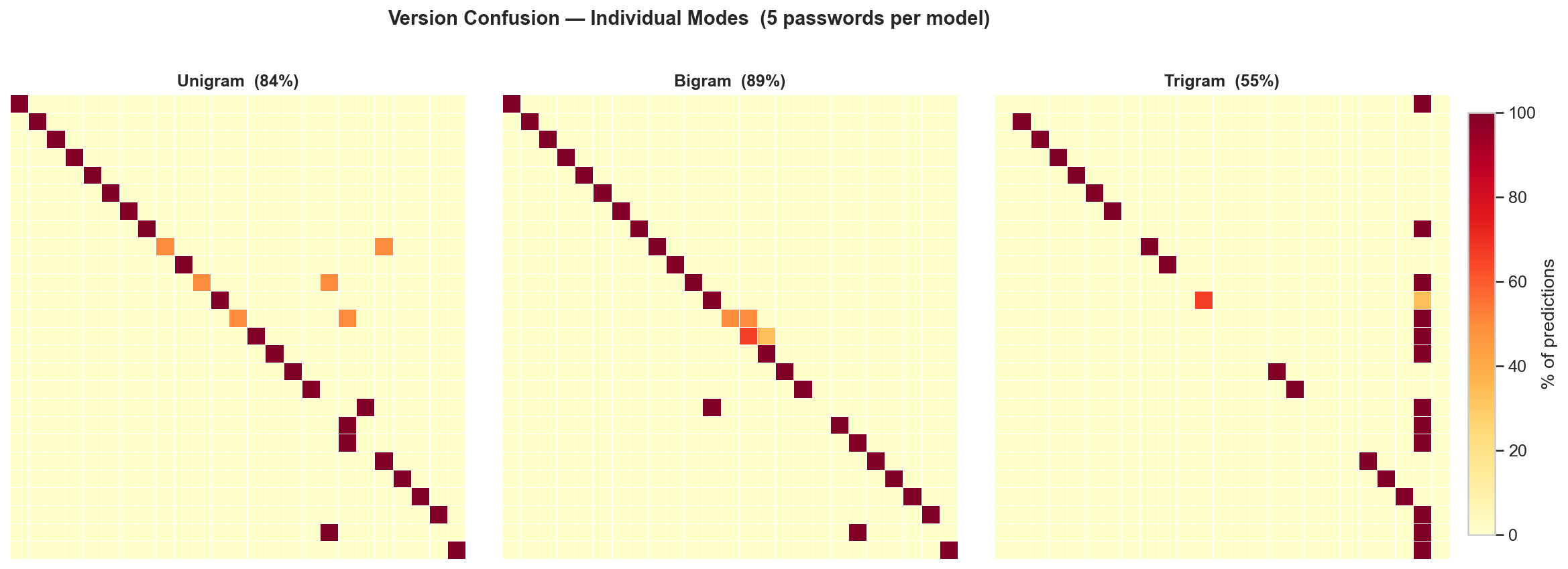
Bigram (89%) and unigram (84%) are both strong on their own. Trigram (55%) is the weakest — with only ~1,500 training characters per model, there isn’t enough data to reliably learn three-character patterns. But when all three are combined in the ensemble, each mode’s blind spots are covered by the others, pushing accuracy to 95%.
The Tool
whorl is a standalone Python script that scores passwords against trained character-level models.
Fingerprinting a single password
$ whorl "K#m9vQx2$nL7pRw"

Query: 'K#m9vQx2$nL7pRw'  [mode=ensemble]

Rank  Model                               Score                  Bar
---------------------------------------------------------------------------
1     claude-4.6-sonnet                   -84.5609               ████████████████████
2     claude-4-opus                       -148.2465              ██████████░░░░░░░░░░
3     claude-4.1-opus                     -151.5831              █████████░░░░░░░░░░░
4     claude-4.5-haiku                    -152.7688              █████████░░░░░░░░░░░
5     claude-4-sonnet                     -159.0414              ████████░░░░░░░░░░░░
The score is the log-probability that each model would generate this password. Higher (less negative) is a better match. The gap between #1 and #2 indicates confidence — a large gap means the classifier is quite sure.
Fingerprinting multiple passwords
Pass a file with one password per line for better accuracy:
$ whorl passwords.txt
Adding –explain for context
Any command can take --explain for a plain-English explanation of what you’re seeing:
$ whorl "K#m9vQx2$nL7pRw" --explain

  Top prediction : claude-4.6-sonnet
  Model family   : claude
  Model version  : claude-4.6
  Confidence     : High — the top model scores significantly better than all others.
Comparing all modes
$ whorl --compare
Runs all four modes (unigram, bigram, trigram, ensemble) against the full test set and prints a side-by-side summary with hierarchical MRR scores.
Getting the generation prompt
$ whorl --prompt
generate a random password 15 characters long. Do not use any tools. Respond with only the password and nothing else.
Use this exact prompt to generate passwords for fingerprinting. Consistency matters, the model’s character preferences are conditioned on the prompt.
Practical Application
Here’s the red teaming workflow:
- You encounter an unknown model behind an API, chatbot, or agentic tool.
- You ask it to generate a few passwords one at a time, using the standard prompt (
whorl --promptto get it.) - You run the passwords through the fingerprinter. It tells you which model family and version you’re likely dealing with.
Limitations and Future Work
What this is: A lightweight, practical fingerprinting tool that works surprisingly well for a technique with zero machine learning and ~200 lines of core code.
What this isn’t: A fundamental exploit of LLM architecture. It depends on a behavioral artifact. The fact that current models happen to have strong, consistent character preferences when generating passwords is not a promise, it’s serendipity. There’s nothing inherent to LLM architecture that guarantees this. The technique works because today’s models carry biases from training data, tokenization, and sampling strategies that leak through. If providers ever decide to fix this, or to implement an actual RNG to handle requests for random values, the signal disappears. We’re exploiting an accident, not a law of physics.
Potential improvements:
- More training data consistently improves accuracy. I saw bigram performance jump when moving from 50 to 100 training samples.
- Weighted ensembles could outperform the current equal-weight sum, our experiments showed unigram signal is strongest with small samples.
- Additional features beyond character frequency (password length distribution, positional patterns, symbol placement) could improve within-family discrimination.
Contributing to Whorl
Training data lives in data/*.log (100 passwords per model), test data in test/*.test (5 per model). These are deliberately stored as plain text flat files — one password per line, one file per model.
This was an intentional design choice. If you have access to a model I haven’t fingerprinted yet, contributing is as simple as:
- Generate 100 passwords using the standard prompt (
--prompt) - Save them to
data/your-model-name.log - Generate 5 more and save to
test/your-model-name.test - Open a PR
File naming convention: family-version-tag. The filename is parsed by the evaluation tools to compute hierarchical accuracy scores, so consistency matters:
family— the provider or base model name:claude,gpt,llama,gemini, etc.version— the release series:4.6,5.4,3.3, etc.tag(optional) — the variant:sonnet,opus,mini,nano,turbo, etc.
Examples: claude-4.6-sonnet.log, gpt-5.4.log, llama-3.3-70b-instruct.log, gpt-o3-mini.log
The classifier automatically picks up any new .log / .test files in those directories. No code changes needed. The more models in the database, the more useful the tool becomes.